

Instead of manually chasing social comments, messages, and scattered inquiries, build a workflow that connects each post to a clear website destination, a solid inquiry, and confirmed booking. You’ll know what happens next—and your prospective client will, too.
- Purple Essence recommends connecting social posts, website inquiries, follow-ups, and bookings before adding more marketing tasks.
- A "social media to booked clients" workflow needs clear ownership, not necessarily automation.
- Record inquiries and confirmed bookings separately; interest alone is not a booked client.
- Test the complete customer path before sending visitors through it. Then check it again.
I’m Kathy G. At Purple Essence, I help women-led business owners connect their digital presence rather than treat every channel as a separate, overwhelming project. Purple Essence's digital strategy is best for small business owners who want their website, social media, and messaging all connected and working together.
Why this matters
I know you've put real work into what you do. A prospective client shouldn’t have to piece together what you offer, determine it fits their needs, and search for how to reach you.
For your specific project marketing plan, make sure you give each part of the journey a job. For example, your social content introduces a product need, your website explains your services, and your inquiry process starts a conversation. A qualified booking follows an agreed next step—not just a reaction to a post.
This guide focuses on service sales, including creative projects and appointments. If you sell products use the same clarity checks, but treat an order—not an inquiry—as the purchase outcome.
Before you start
- Gather access: Be sure to have access to edit your social profiles, know the relevant website pages to link to, have access to your inquiry form, and the inbox receiving those inquiries. You also need access to your scheduling tool (like Calendly or Acuity ), if you use one. Many small business owners have others create these and then don't have access or forget passwords. Keep all your important access points active, and keep your passwords safe and readily available to you.
- Prepare your materials: Choose one product, its intended buyer, the next action you want, and the information needed to find that buyer. Have your actual purchase terms ready; don’t invent new terms just to fill a form.
- Check the hidden handoff: Submit a test inquiry before promoting the product page. A form confirmation does not prove that the right person received the message. Check the receiving inbox, spam folder, and reply address.
Keep in mind you don’t need a new or paid tool to start this process. An existing Google form, an inbox, and a private tracking sheet can support this process, although someone must oversee the tool and incoming inquires.
Your inquiry path
Start with the service that is most requested, not the social platform you feel pressured to use. I’d rather see one clear route to an inquiry than several unfinished routes competing for attention.
Configure the customer’s next step
- Choose one booking goal. Decide whether this path should lead to a discovery conversation (usually free), a project inquiry (get to work and pay immediately), or an appointment request. Use the action that matches how you'd like to start the process with a prospective client.
- Choose the destination page. Send visitors to a page that explains your chosen service and its next step. If your homepage does that clearly, use it; a separate landing page is not a requirement.
- Match the message. Write the social caption using the same service description visitors will find on the destination page. Don’t promise a booking in the post if the page only accepts requests.
- Explain what happens afterward. Tell prospects whether you’ll review their inquiry, reply with questions, or direct them to scheduling. Only list response commitments you can meet.
- Test on your phone. Find and follow the actual profile or post link, read the page, and complete the inquiry. Check that the action is clear without instructions from you.
Expected result: A visitor can move from the social post call to action and arrive at the correct inquiry destination without guessing or confusion.
Use this simple sequence to check the handoffs. Each stage needs a clear destination before you add another post to the mix.
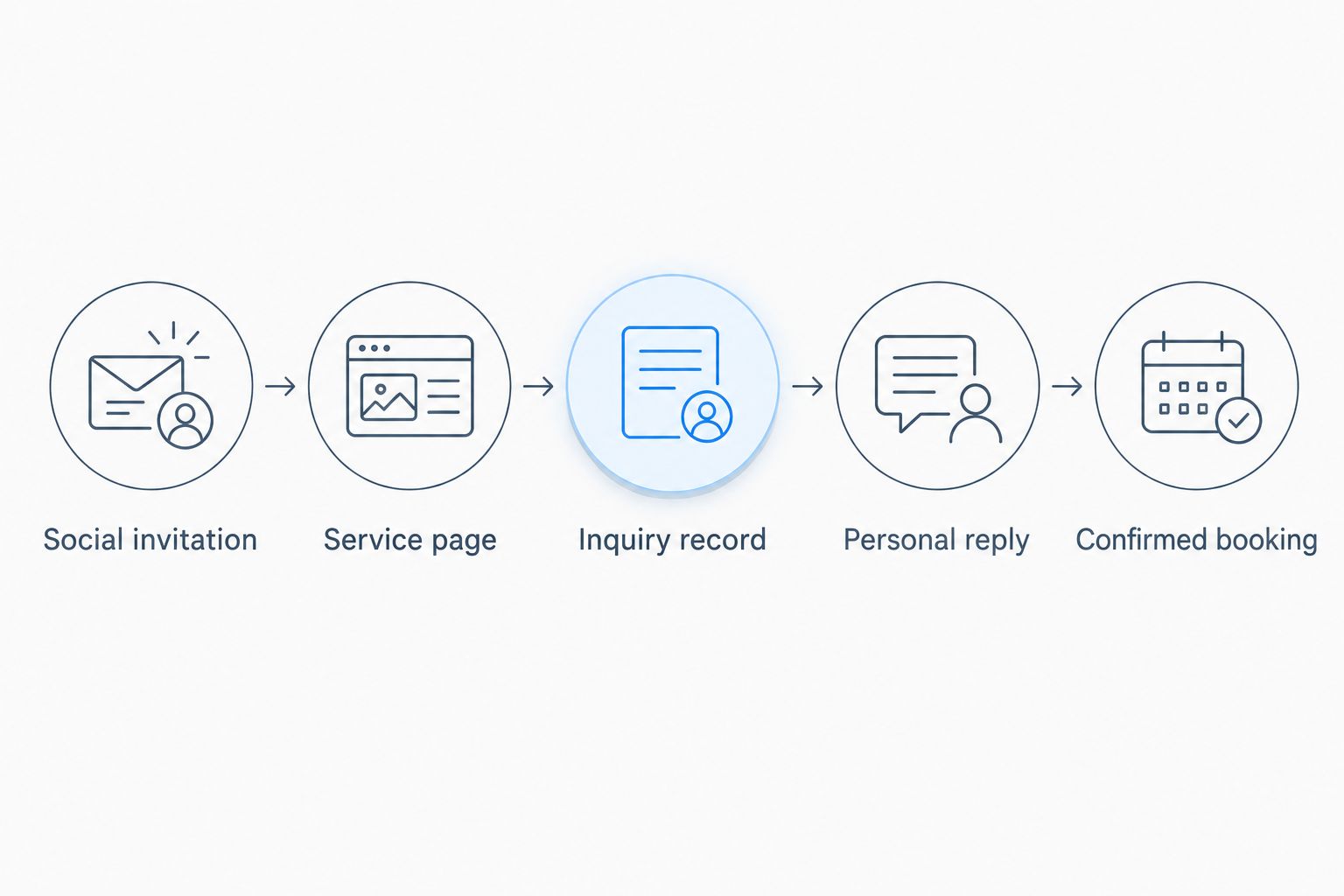
Your inquiry record
A message saying “I’m interested” deserves attention, but it isn’t a confirmed booking. Keep interest, conversations, and agreed work separate so your records describe what actually happened.
Configure a simple tracking sheet
The bold labels below are columns you create yourself, not buttons in a particular platform. Keep the sheet private and limit access to people handling inquiries.
- Create the fields. Add Name, Contact, Source, Service, Status, Next action, Follow-up date, and Booking reference. Record only information needed to handle the inquiry.
- Define your statuses. Use New inquiry, Conversation underway, Awaiting client, Booked, and Closed. Write a short definition for each so everyone uses them consistently.
- Define "Booked" precisely. Match it to your real business process: an accepted appointment, an agreed project, or another documented confirmation. Sending a scheduling link does not meet this definition.
- Record the source. Ask how the person found you when it’s appropriate, or record the source information your existing setup captures. Use Unknown when you cannot establish it.
- Assign the next action. Every open inquiry needs a specific task and an owner. If you work alone, that owner is you; the task still belongs in the record.
Expected result: You can identify every open inquiry, its current stage, and the next action without rereading an entire message history.
A tracking sheet is a working record, not a place for passwords, payment-card details, or unrelated personal information. Keep those out.
Your reply and follow-up routine
You don’t need to sound like a sales script. Your reply should show that you understood the request and help the person take the next useful step.
Configure the conversation handoff
- Choose a review routine. As a starting point, reserve 15 minutes each business day to review new inquiries. This is a suggested work block, not a promise to clients.
- Prepare reply building blocks. Include acknowledgment of the person’s need, any essential fit question, and the next action. Edit those pieces for each inquiry instead of sending an untouched template.
- Set a realistic reply target. Consider 1 business day as an internal starting target only if your schedule supports it. If it doesn’t, choose a target you can maintain before publishing any commitment.
- Agree on follow-up. When someone needs time, ask when it would be useful to reconnect. Put that date and the reason in Follow-up date and Next action.
- Close the loop respectfully. If the person declines or needs more time, update Status and stop the sales follow-up. An inquiry is not automatic permission to add someone to a newsletter, for example.
Expected result: Each active conversation has a relevant reply or an agreed next action, rather than an indefinite reminder to check in.
My recommendation: answer the actual question before asking someone to book. If they asked whether your service fits their situation, get on the phone or a video call and answer that question. Be curious, inquire more, or have a short list of new client questions handy for first phone calls. They'll tell you when they're ready and that's when you send a proposal or link to buy.
Your booking confirmation
The last handoff deserves the same attention as the first. Your client needs to know what they agreed to, and you need a reliable record of that agreement.
Configure the final confirmation
- Check the agreement. Confirm the service, appointment or project details, and whatever acceptance steps your business requires. Don’t mark work as booked while those requirements remain unresolved.
- Send the confirmation. State the agreed next step and any preparation the client needs. For scheduled conversations, include the date, time, time zone, and meeting method.
- Update the record. Change Status to Booked only when your defined conditions are met. Add the relevant confirmation reference to Booking reference.
- Test the handoff. Walk through your process with a clearly labeled test inquiry. Check the incoming message, reply destination, scheduling details, and final record; keep test activity separate from real results.
Expected result: Both you and the client can identify the agreed booking and what happens next.
For a worldwide audience, write out the time zone rather than assuming it. Familiarity with a city does not tell you where a prospective client will be when you meet.
When an existing inquiry changes
Not every social interaction starts a new relationship. Someone who already contacted you might return through a comment or message with a different request.
Be sure to search for an existing inquiry before creating another record. Confirm that it’s the same person, then update Service, Status, and Next action to reflect the new conversation. Keep the earlier context so they don't repeat everything.
If an existing client wants separate work, create a distinct inquiry for that request. Don’t overwrite the record of an already confirmed project.
Choose the right tracking approach
| Approach | Best for | Advantage | Limitation |
|---|---|---|---|
| Manual inquiry record | Owners establishing their process | You can change fields and stages directly | You must enter and update information yourself |
| Connected inquiry record | Owners with a defined, repeatable process | A supported connection can pass submission details into a record | Field mapping, permissions, and failed transfers need checking |
Define the process manually before connecting it. A connection transfers information; it does not decide whether an inquiry is suitable or whether a client has agreed to book.
If you add automation, verify its current setup instructions in the service you choose. Test new inquiries, changed details, and failed transfers before relying on it.
Troubleshooting the handoffs
People react to posts but don’t inquire
Check whether the post has a clear call to action. Then follow its destination: does the page explain the same service, or does it make visitors search again? Reactions alone do not establish purchase intent.
The form works, but no message arrives
Check the form’s recipient configuration, spam filtering, and submission record if your system provides one. Retest after fixing the issue, including the reply address. Don’t keep sending traffic to an unverified inbox handoff.
An acknowledgment goes out, but nobody replies personally
Separate receipt confirmation from the actual response task. Assign ownership and add a next-action date. A message confirming receipt should not be treated as a completed conversation.
Your sheet shows duplicate inquiries
Compare contact details and conversation history before combining records. Keep separate requests separate, but don’t count repeated messages about the same request as additional prospective clients.
Your booking count includes unconfirmed requests
Review your Booked definition and move unresolved requests back to the appropriate stage. Keep inquiries and confirmed bookings as separate counts when you review your results.
Customize your workflow
Start your 2027 review with 30 minutes to inspect recent inquiries and walk through the customer path. That is a suggested review session, not a performance benchmark. Look for unfinished replies, unclear invitations, and requests that reached the wrong destination.
Choose one issue to fix first. If people misunderstand the service, revise the explanation. If inquiries arrive but stall, inspect the conversation and next step before deciding you need more social content.
At Purple Essence, my preferred starting point is a consult. On that call, we can talk about your business before choosing an audit or strategy work. Direct audit questions are welcome, too. You’re the boss; the work should fit what you need.
Let’s connect!
Talk with Kathy G about your website, social media, and the path from interest to inquiry.
FAQ
What is a "social media to booked clients workflow" for a small business?
It is a defined path from a social invitation to a service page, inquiry, conversation, and confirmed booking. Each stage needs an owner and a clear next action.
Do I need automation to turn social media inquiries into bookings?
No. You can manage the workflow with an inquiry form, an inbox, and a private tracking sheet. Automation is useful only when its supported connections match a process you have already defined.
Should I send social followers to my homepage or a service page?
Send them to the page that clearly explains the service mentioned in your invitation and provides the appropriate next step. A homepage works when it does those jobs without making visitors search again.
Can I count a direct message as a booked client?
No. A direct message is an inquiry until the person completes your actual booking requirements. Record interest and confirmed work separately.
How quickly should I respond to a new inquiry?
Choose a response target you can consistently meet and make ownership clear. One business day is a suggested internal starting point, not a universal requirement or a Purple Essence response promise.
What should I measure in my social media booking workflow?
Track inquiries, their sources when known, current stages, and confirmed bookings separately. Use those records to identify unfinished handoffs without treating every social interaction as a prospective sale.
Can Purple Essence help me decide where the process breaks down?
Yes. Purple Essence offers tailored digital marketing, website, and social media strategy. Request a consult with Kathy G to discuss your business before choosing audit or strategy work.
One last thing
Test your process without filling in the blanks from memory. Read only what a new visitor can see: the invitation, the page, the form, and the reply. If the next step makes sense only because you already know your business, rewrite it. That’s a useful fix before another post goes live.
Recent Comments